A dog walker with six recurring clients can still feel buried. One text thread says Tuesday, another says Wednesday, two clients want photo updates by noon, and a payment reminder sits unanswered while the next neighborhood is already running late. At that point, dog walking software stops being a convenience and starts acting like the operating system for the business.
The shift isn't subtle anymore. The dog walking service app market has been estimated at USD 1.85 billion in 2024 and is forecast to reach about USD 7.1 billion by 2033, with a 12.6% CAGR from 2025 to 2033 according to DataHorizzon Research. Another market view places the category at USD 1,241.45 million in 2025 with a projection to USD 3,620.22 million by 2032, and says North America holds roughly 46% of the market in the strongest installed base and monetization zone, again showing how far this has moved beyond a side tool into a real software category.
The Shift to App-Mediated Pet Care
A solo walker used to survive on memory, receipts, and a phone that never stopped buzzing. That setup works until the business starts to repeat itself, which is exactly when the clutter becomes expensive. Recurring walks, route changes, payment chasing, and client updates all stack up, and the software becomes the place where those moving parts finally stop colliding.
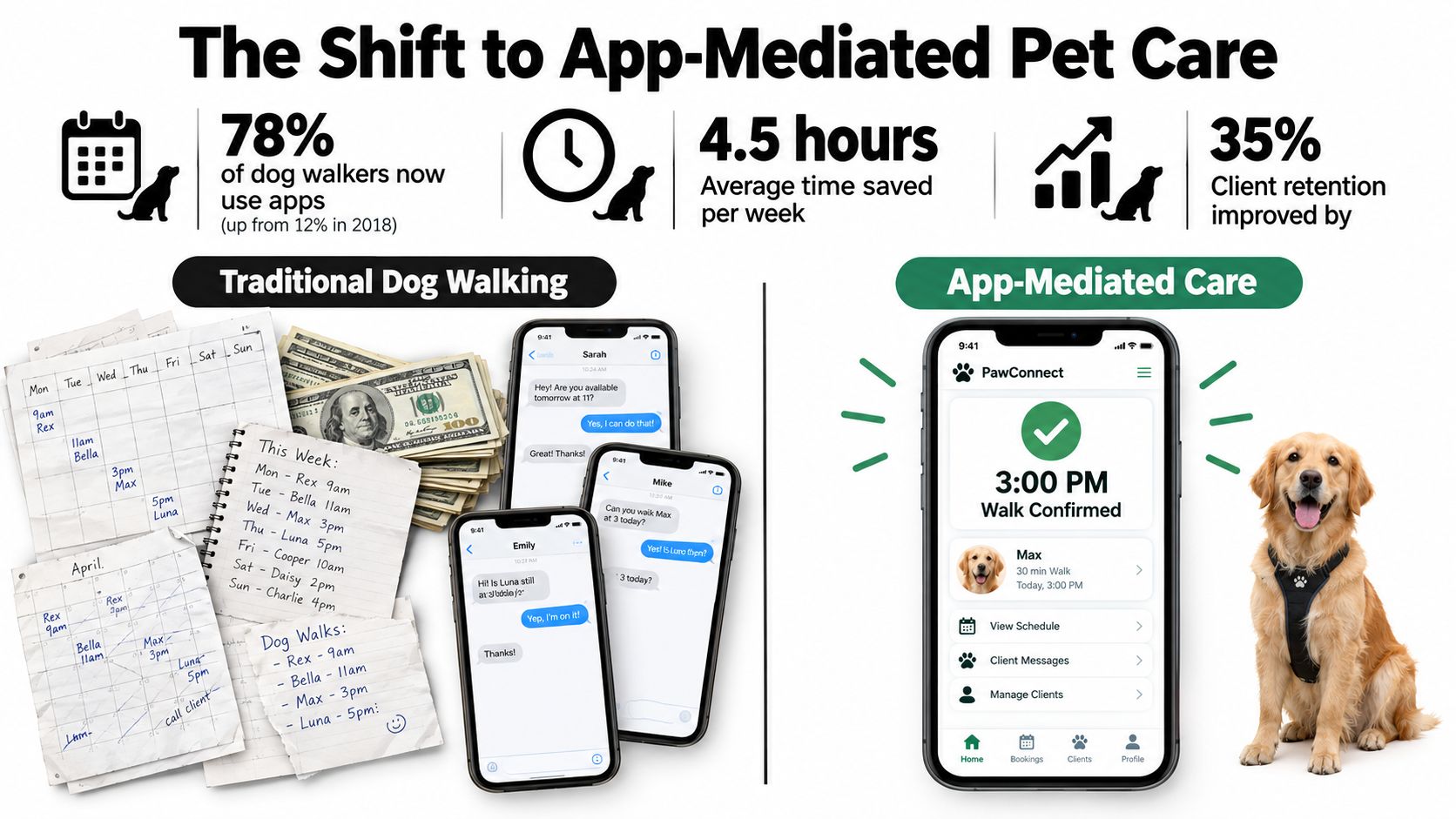
From scattered coordination to repeatable service
The key change is not just that software looks cleaner. It is that app-mediated care makes the business repeatable. One source says more than 42 million users globally relied on mobile platforms to schedule dog walking services in 2023, and digital dog walking platforms handled over 120 million booked walks that year, with more than 1.8 million registered dog walkers using those platforms and over 150,000 new walker profiles created between January and December 2023, while urban dwellers accounted for 84% of total usage Market Growth Reports.
That matters because the software is no longer just a calendar. It is where booking, proof of service, client communication, and monetization meet. In urban markets especially, the operational reality is recurring service, mobile payment flow, and quick adjustments when a walk shifts by an hour or a neighborhood gets tight.
Practical rule: if a platform cannot handle recurring visits without manual cleanup, it will not hold up once the business reaches regular weekly routes.
The manual version also hides friction in places that founders underestimate. Time gets lost in message threads, cash handling, and repeated explanations of the same pet notes. App-mediated care compresses those tasks into one workflow, which is why the category keeps growing instead of flattening out.
Core Features That Drive Operational Efficiency
A dog walking business feels efficient only when the field work stays visible. If the walker can prove the visit, keep the route moving, and hand off a clean record for billing, the day does not have to be reconstructed from texts and memory. Live GPS, geofencing, and visit traceability are the parts that make that possible.
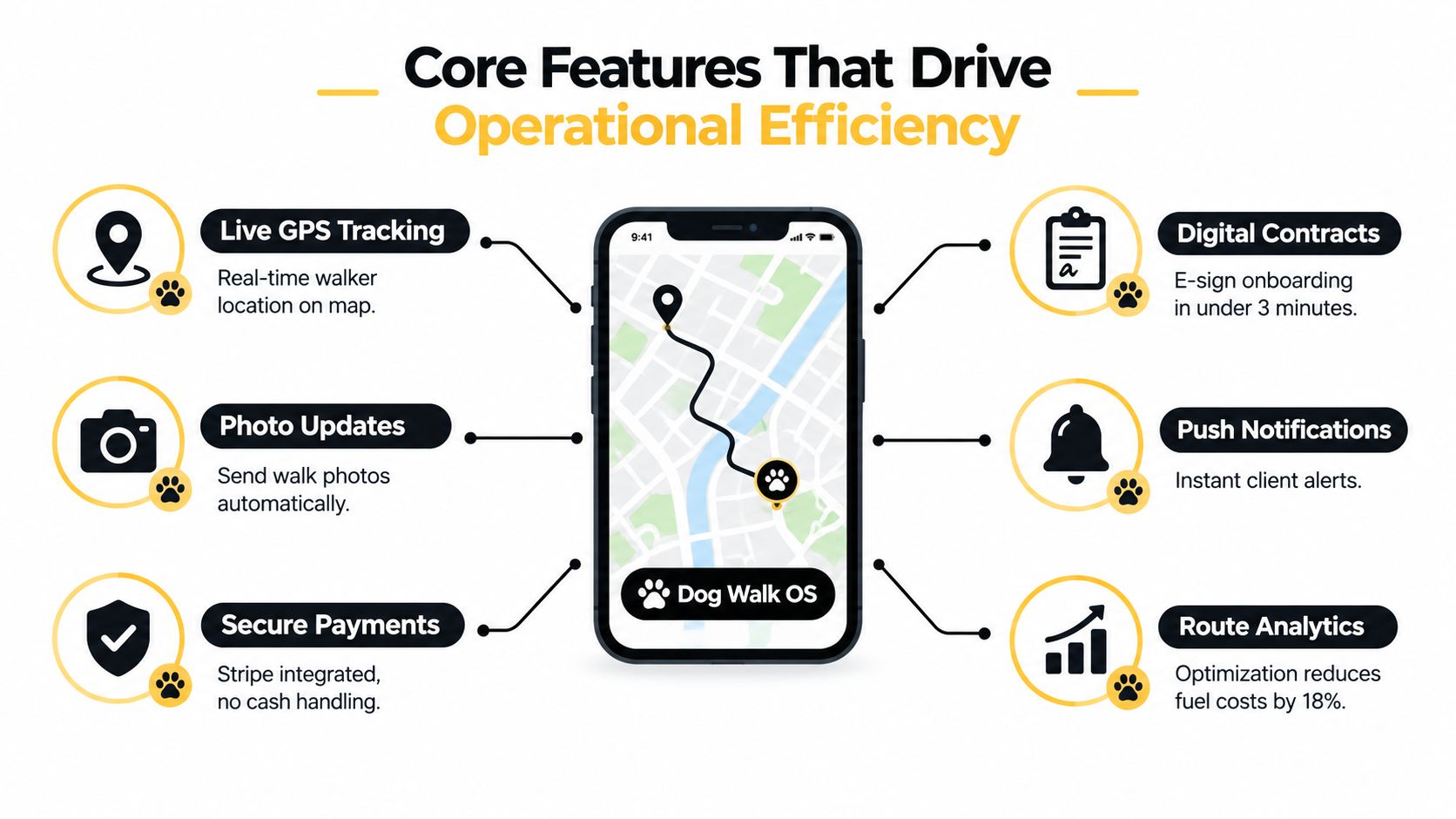
What GPS and geofencing solve for dispatchers
Operational dog-walking platforms increasingly rely on live GPS tracking and geofenced arrival and departure logic because field-service visibility is otherwise weak OctopusPro. For dispatchers, that turns routing into a location-aware scheduling problem instead of a static calendar problem. A late arrival is easier to reroute. An urgent booking is easier to assign to the closest available walker. The team spends less time guessing where the work is happening.
A strong platform should also create an auditable chain from check-in to checkout. For example, DoggyLogs records the GPS route, distance, duration, photos, notes, and client notifications in one mobile workflow Google Play app listing for DoggyLogs. That kind of record helps tie service proof to invoicing and client reports, which matters when a customer wants confirmation or the connection is unstable in the field.
The features that matter in the field
- Live GPS tracking. Clients and dispatchers need location visibility, not vague reassurance.
- Photo updates. A quick proof-of-service photo closes the loop faster than a manual text.
- Secure payments. Cash handling creates reconciliation work that software should remove.
- Digital contracts. Intake should be fast enough to complete before the booking friction becomes a lost lead.
- Push notifications. Timely alerts stop clients from wondering whether the walker showed up.
- Route analytics. Better routing reduces wasted travel and keeps the day dense.
A platform that logs the walk but cannot connect that visit to billing leaves part of the job undone.
Matching Software to Your Business Model
Solo walkers, small agencies, and marketplace operators do not need the same stack. A solo provider usually wants speed, clarity, and a clean client experience. A team needs dispatch discipline, role visibility, and enough structure that one person's mistake does not break the day for everyone else.
Solo operators need low-friction tools
For an independent walker, the priority is getting from request to confirmed booking without forcing the client through unnecessary steps. The mobile interface has to be quick, the payment path has to be simple, and recurring visits should not require repeated setup. Overbuying enterprise features at this stage usually adds overhead without improving service.
Small teams need control without drag
Once more than one walker is in the field, scheduling becomes a coordination problem. The software has to make the calendar visible, prevent overlap, and keep client notes available to the whole team without making the admin side heavy. Here route optimization and staff assignment start paying for themselves, not because they sound advanced, but because they reduce miss-handling between handoffs.
Marketplaces need infrastructure, not just scheduling
Larger pet-care marketplaces need more than booking screens. They need workflow portability, public provider discovery, and integrations that don't box the business into a single path. A public directory can help fill the top of the funnel, but the software still has to support provider onboarding, service consistency, and payment flow across more moving parts than a small agency ever sees.
The mistake is buying for the business you hope to become next year, then discovering the current team can't use half the system today.
How Scritches Can Help
A platform earns its place when it removes repeated admin without making pet parents work harder. That is where scritches stands out for solo operators and small teams, because it centers the parts of the workflow that get used every day, online booking, scheduling, client and pet records, and payments, without pushing the business into a clunky enterprise setup.
Where it fits well
Scritches is strongest when the business wants a low-friction booking flow and a clean client experience. Its booking model lets pet parents request services without creating an account, which removes a common point of friction, and its scheduling logic is built around recurring walks and availability awareness, which matters more here than flashy add-ons. It also supports client and pet profiles, digital agreements, Stripe payments, offline payment tracking, report cards, and review requests, so the owner can keep the entire daily operation in one place.
The practical value is in the workflow, not the feature count. Centralized intake can auto-populate the CRM from booking submissions, which reduces duplicate entry. Review cards and automated feedback requests help the business close the loop after the visit, which matters when the owner wants more repeat work without spending evenings on admin.
For operators comparing platforms, the key question is whether the software matches the size and rhythm of the business. If the business is still small, values a quick setup, and wants an easier path away from texting and spreadsheets, Scritches is a sensible fit. If the operation is already managing a larger staff structure, the trade-off shifts toward heavier scheduling systems.
Hidden Pitfalls and Selection Criteria
Most buyers compare features and stop there. That's not enough, because the expensive problems show up after the contract is signed, when the team needs to move records, handle an incident, or change platforms without losing active bookings.
Liability clarity matters more than GPS
GPS check-in and check-out have become table stakes across leading platforms, but they do not answer the harder question of who carries risk when a dog bites, injures another dog, or causes an incident. Recent industry coverage notes that owners can still be liable even when a platform's walker is involved, while most dog walking software pages emphasize tracking and scheduling instead of insurance clarity or escalation workflows Outside Online. That gap matters because buyers often assume proof of service is the same thing as risk management. It isn't.
Ask vendors who documents the incident, who gets notified first, and where the escalation record lives.
Migration lock-in is a real cost
The other trap is switching friction. Independent 2026 coverage reports that data migration concern is cited more often than pricing as the reason businesses stay on a suboptimal platform, and that six of eight shortlisted platforms raised prices or restructured plans between 2024 and 2026 Dog Walker Central. That tells buyers something feature lists often hide, the platform may be fine until the business wants to leave it.
A serious selection process should test four things before any commitment.
- Data portability. Ask what exports exist for client histories, recurring bookings, route notes, and payment records.
- Incident workflow. Ask how the system logs a bite, injury, or dispute, and who can access that record.
- Team onboarding. Ask how fast a new walker can be trained without breaking the current calendar.
- Workflow fit. Ask whether the software works for recurring routes, not just one-off appointments.
Hidden cost rarely sits in the subscription line. It sits in cleanup, re-entry, and service disruption after the team has already committed.
Implementation Steps for a Smooth Launch
A new platform should reduce chaos, not create a second job for the owner. The cleanest rollout starts with a narrow migration, then expands only after the calendar, payments, and notifications behave the way the business needs them to.
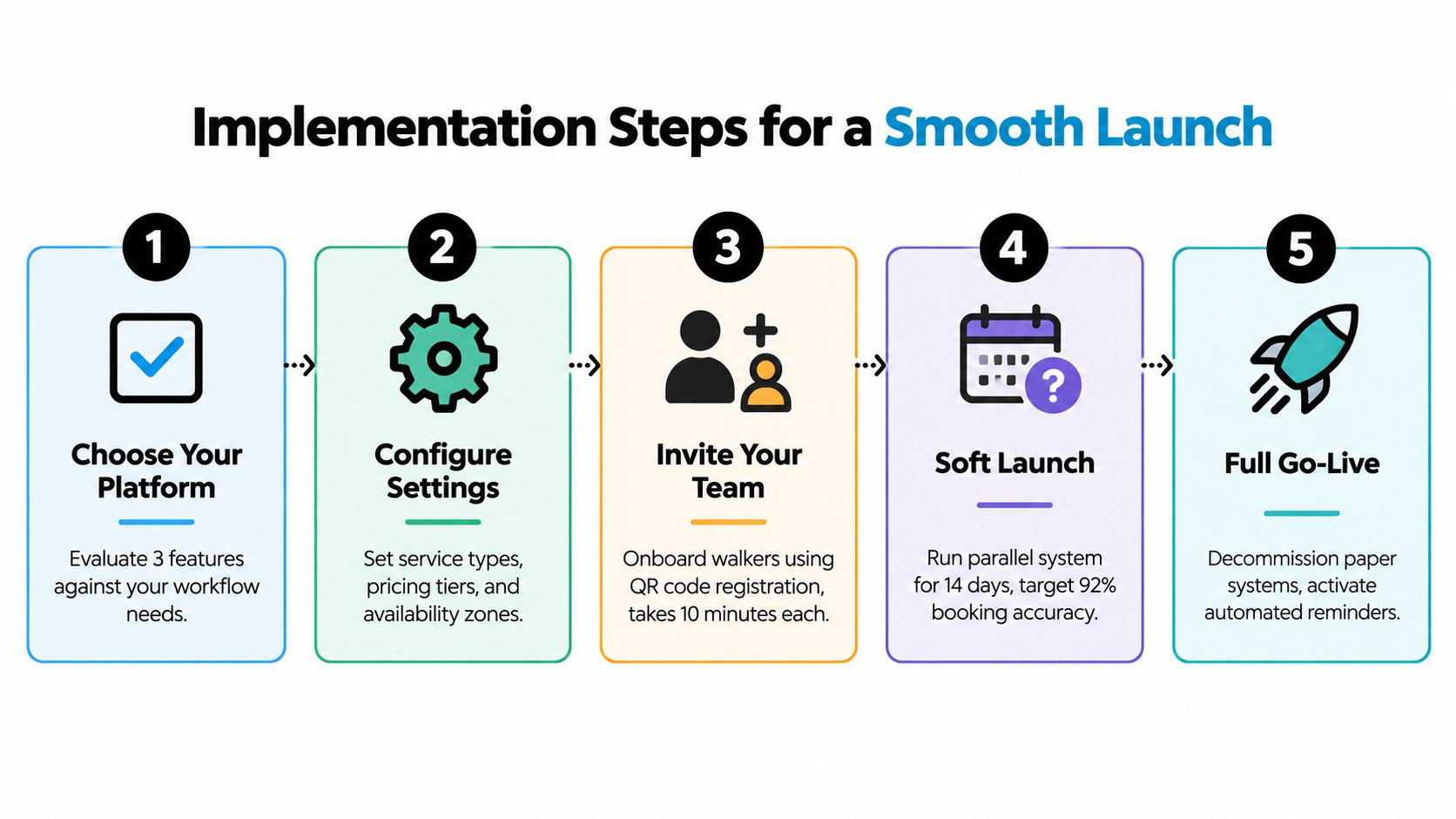
A practical rollout sequence
- Choose your platform. Compare it against the way the business runs, not a generic feature checklist.
- Configure settings. Set service types, pricing, and availability zones before inviting anyone else in.
- Invite your team. Onboard walkers into the mobile workflow early so they can spot friction before clients do.
- Soft launch. Run a parallel system with a small group of trusted clients before turning off the old workflow.
- Full go-live. Decommission the paper process only after booking, updates, and payment flow are stable.
The biggest mistake is launching everything at once. A soft launch gives the owner a chance to catch notification failures, route issues, and calendar mismatches before they affect the full client base. For businesses that are also choosing a business identity, the same launch window is the right time to think about brand continuity and the domain that will carry that brand forward. A practical walkthrough for that part of the process is available in this domain setup guide.
Treat the first two weeks as a controlled test, not as proof that the system is finished.
Naming and Branding for Pet-Tech Startups
Software gets the workflow right, but the name is what clients remember after the walk is over. In pet-tech, that matters because the market is crowded with generic-sounding tools, and trust often starts with whether the business looks intentional before anyone even books.

Brand names need to sound reliable
A short, pronounceable, memorable domain does a lot of work for a startup. It improves recall, looks more credible in a booking flow, and keeps the business from sounding like a temporary side project. The hard part is availability, because the best .com names are scarce, which is why curated marketplaces are useful when the team wants a premium name without spending weeks hunting through dead ends.
That is where a domain-first brand decision connects to operations. If the platform is meant to project reliability, the name should do the same, and the visual identity should be ready at the same time. OYZTA's marketplace model, with curated premium .com inventory and a ready-to-use wordmark logo for each domain, is built for that kind of launch speed.
What founders should look for
- Short length. Easier to say, spell, and remember.
- Clean pronunciation. Fewer corrections in client conversations.
- Clear visual fit. The name should look good on booking pages and app screens.
- Brandable rather than descriptive. Descriptive names get generic fast.
- Transfer simplicity. The less friction between purchase and use, the better.
The same principle applies to software choice. A strong product and a strong name both reduce friction, which is why founders should think about them together instead of in separate budget buckets. A useful framework for that brand decision is in this naming guide.
Building a Scalable Pet Service Business
Dog walking software is not just a scheduling layer. It is the structure that keeps bookings, proof of service, payments, and client records from scattering the moment the business grows past a handful of regulars. The right platform should also leave room to move later, because easy data portability is part of scalability, not a bonus.
The same logic applies to the brand. A business that wants to scale needs software that supports repeat work, a name that clients can trust, and a domain that won't feel dated when the team expands. That combination matters whether the founder is handling a solo route or building a small pet-care network.
The cleanest decisions usually come down to three questions. Does the system support the actual workflow. Can the business leave it without chaos. Does the name support trust at first glance. If the answer is yes on all three, the platform and the brand are doing real work instead of adding overhead.
For teams planning the next stage, the best next move is simple, choose the software that matches the current operation, secure a memorable domain that can grow with the brand, and keep the setup portable enough that the business doesn't get boxed in. OYZTA is one place to start if the goal is a premium, brandable domain that can anchor that next phase.